

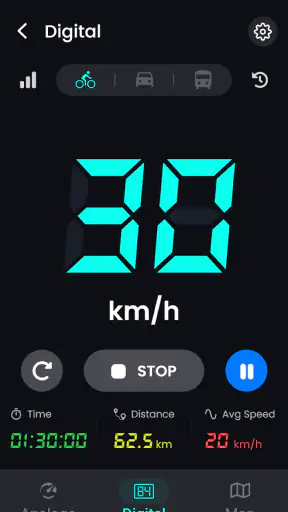
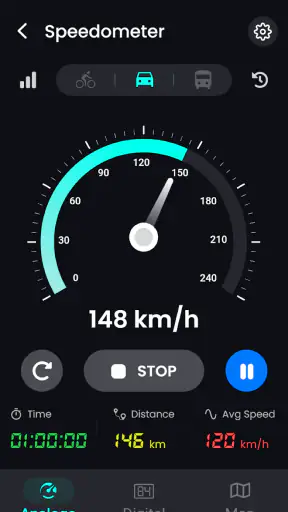
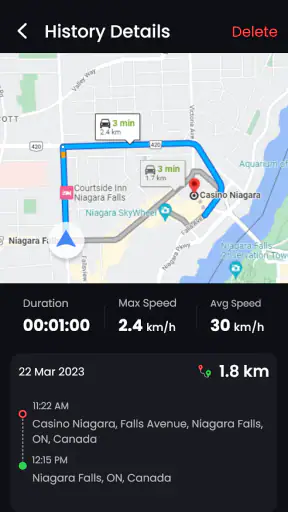
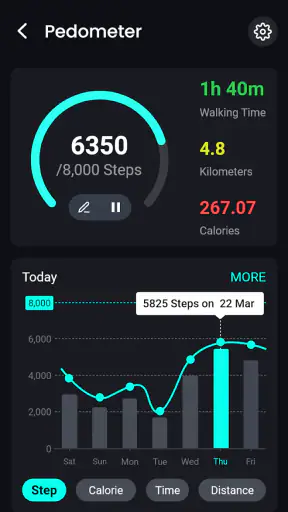
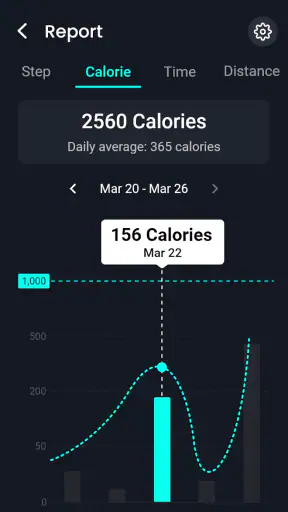
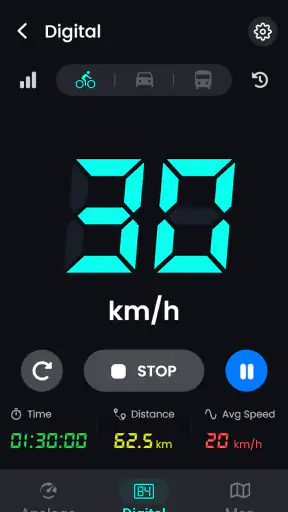
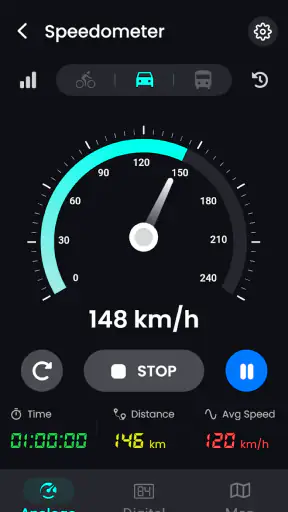
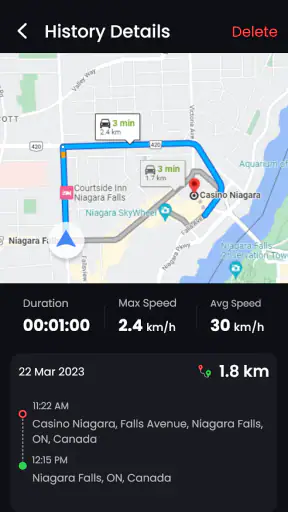
I like tools that do one job without trying to become an entire travel platform. Speedometer - Odometer App takes that approach: it is a Maps & Navigation app from GeniusTools Labs that focuses on showing your movement speed, distance, elapsed time, and route position. In my experience, that makes it more useful as a quick visual instrument than as a replacement for a full navigation service.
The app is free to start, is suitable for everyone, and has passed the point where an app feels untested in the wild. It has a 4.4 average from around 13 thousand ratings and more than a million installs. That does not guarantee a perfect experience on every phone, but it does suggest that the basic idea is easy for many people to understand.
I would recommend it to someone who wants a simple GPS speedometer for driving, cycling, walking, or checking a trip without depending entirely on a vehicle dashboard. I would be more cautious about recommending it to anyone expecting turn-by-turn directions, detailed route planning, or the precision of dedicated professional equipment. Its value is in keeping a few travel readings visible, not in replacing every navigation tool.
Where the first-use experience can go wrong
The most common frustration with an app like this is usually not the speed display itself. It is getting from opening the app to receiving a trustworthy location signal. A phone can show a map while still taking time to establish a useful GPS reading, and a speedometer screen can appear ready before the positioning information is stable enough to interpret.
I would give the app a short pause before moving. Starting immediately can produce a zero reading, a delayed reading, or a value that changes sharply during the first moments. That does not automatically mean the app is broken. GPS positioning depends on the phone, the surrounding environment, and the quality of the signal available at that moment.
Buildings, underground parking areas, dense streets, tree cover, and enclosed vehicles can all make the first reading less dependable. If the display seems frozen or unusually slow, I first move to an open area and wait rather than repeatedly closing and reopening the app. Restarting can sometimes help, but it does not create a better satellite signal.
Another point that can confuse new users is the difference between a map position and a reliable speed reading. Seeing your general location does not necessarily mean that every number on screen is already accurate. I treat the first few moments as a settling period and avoid using the initial value to judge a trip or compare my speed with another instrument.
The app supports familiar speed units such as kilometres per hour and miles per hour, which is helpful when travelling between countries or using a phone configured differently from the local road signs. I recommend choosing the unit before setting off. Changing it while moving is possible in principle for many apps, but it is an unnecessary distraction during a journey, and a wrong unit can make an otherwise sensible reading look alarming or implausible.
There is also a practical safety issue. A phone-based display is something I would set up before driving, then place where it can be seen without handling the phone. I would never treat the app as a reason to interact with the screen in traffic. For cycling or walking, the same principle applies: prepare the view first and check it only when doing so is safe.
What I check before trusting the display
My first check is simple: I confirm that the phone itself has a usable location signal. If other location-based apps are also struggling, the problem is probably broader than this speedometer. I then make sure the phone has enough battery for the planned trip, because continuous location use can be demanding even when the app itself is lightweight.
I also check whether the phone is positioned sensibly. A device buried in a bag, pressed against a metal surface, or placed where the vehicle blocks reception may behave differently from one mounted near a window or carried in the open. I do not expect perfect results from a phone placed in a poor signal position.
Before starting a longer journey, I run a short test while stationary and then during gentle movement. This lets me catch an incorrect unit, a delayed reading, or an unexpected display state before the trip matters. It is a small habit, but it prevents the common mistake of discovering setup problems only after leaving home.
The app’s current version is 3.1.2, and it runs on Android 5.0 or later. That broad compatibility is convenient for people using older phones, although older hardware can still affect the overall experience. A supported operating system does not mean that every device has the same GPS hardware, screen brightness, battery capacity, or background behaviour.
How I prepare it for a real journey
For a short drive, I open the app while parked, select the speed unit I understand immediately, and wait until the location view behaves consistently. I then place the phone securely and leave it alone. For a bicycle outing, I use the same process but pay more attention to screen readability and vibration, since a reading that is technically available is not very useful if I cannot glance at it safely.
For walking, the app can be interesting because distance and elapsed time give a simple picture of a route without requiring a full navigation plan. I would not use it as my only guide in an unfamiliar area, though. A speedometer can tell me how I am moving; it does not automatically tell me whether a turn, trail, or destination is correct.
One useful habit is to decide what I actually want to observe before opening the app. If I care about current speed, I keep my attention on that reading. If I care about distance or time, I avoid constantly changing screens or settings. The fewer adjustments I make during movement, the less chance there is of misreading the information or creating a distraction.
I also avoid comparing the phone reading with a dashboard as if one must be exactly right. A car’s speed display and GPS-derived speed can differ because they are calculated in different ways and may update at different moments. The app is best used for a broad, practical indication rather than as a legal or engineering instrument.
Recovering when a trip does not look right
When the display stays at zero while I am clearly moving, I work through the problem in a calm order. First, I stop somewhere safe. Then I check whether the phone has a location signal, whether the app is still open and responsive, and whether the phone has been placed somewhere that weakens reception. I give it a little time in an open area before deciding that the reading has failed.
If the distance seems too low, I consider the route itself. GPS-based distance is not a perfect measuring tape, especially when the signal jumps between positions or disappears temporarily. A short walk through tall buildings can produce a less clean track than a drive on an open road. I would interpret a small mismatch as a limitation of phone positioning rather than immediately blaming the app.
A speed that jumps suddenly deserves the same careful treatment. Sudden changes can come from a temporary location error, a weak signal, or a brief loss and recovery of positioning. I do not use an isolated spike to make decisions. I look for a stable pattern over time and compare it with what I can observe safely around me.
If the app stops updating after the phone has been idle, I first bring the screen back and see whether the display resumes. Phones may manage battery use differently when an app has been in the background or the device has been locked. I would avoid changing several phone settings at once, because that makes it difficult to know what solved the issue. A simple test with the app open and the phone awake is a better starting point.
When a reading remains clearly wrong, I close the app once, reopen it while stationary, and repeat the open-area test. If the problem continues, I restart the phone and test again before a planned trip. These are ordinary troubleshooting steps, but they are more useful than repeatedly tapping the screen while moving.
The app includes in-app purchases ranging from $0.99 to $99.99 per item. I would not make a purchase simply to solve a signal problem. A payment cannot improve a blocked GPS signal, a weak phone antenna, or an unsuitable placement. I would first establish that the basic experience works for my device and routine, then decide whether any optional purchase is worthwhile for my needs.
When the phone or environment is the real problem
It is easy to blame a speedometer app when the underlying issue is the phone. Location can be affected by the device’s hardware, its battery condition, heat, signal environment, and how aggressively it limits background activity. If several location apps show similar behaviour, I would investigate the phone and surroundings before judging this particular app.
Indoor testing is another trap. A phone may know roughly where it is while indoors, yet still struggle to calculate movement speed accurately. Testing beside a window or outside gives a fairer impression than testing in a room, garage, or underground area. I would also avoid judging the app during the first seconds after leaving a covered location.
Vehicle placement matters more than many people expect. A phone hidden low in a console or inside a closed compartment may have a harder time maintaining a clean signal. A secure position with a clearer view toward the outside is generally more sensible, provided it does not obstruct the driver or create a loose object in the cabin.
Weather is not the only consideration, but changing conditions can affect how comfortable it is to keep the phone visible and how consistently a person checks the screen. In rain, bright sunlight, or cold weather, the practical problem may be visibility or handling rather than the app’s calculation. I would plan around those conditions instead of trying to fix them through repeated app resets.
There is also a difference between a useful travel aid and an authoritative measurement device. If I need a certified reading, a commercial vehicle instrument, or data for a formal technical purpose, I choose equipment designed for that role. This app is a convenient everyday reference, not a substitute for specialist measurement hardware.
How it compares with the usual alternatives
A full navigation app is the better choice when I need directions, traffic context, destination search, or route changes. Those apps are built around getting somewhere. Speedometer - Odometer App is more appealing when I already know the route and want a clean view of movement-related information without turning the task into a complete navigation session.
A vehicle’s built-in speed display is usually more convenient for ordinary driving because it is already mounted and visible. The phone app becomes more useful when I am in a vehicle without a readable dashboard, travelling as a passenger, cycling, walking, or checking distance and time across different kinds of trips.
Dedicated fitness trackers can offer deeper exercise analysis, but they may require an account, a wearable, or a more involved setup. This app is simpler for a quick outing. The trade-off is that simplicity also means I should not expect the same training tools, health context, or long-term activity analysis that a specialised fitness product may provide.
Offline navigation tools are designed to preserve maps and directions when connectivity is limited. The app’s appeal is different: it focuses on speed, distance, time, and map-based movement rather than guiding me through a route. If I am going somewhere unfamiliar with unreliable service, I would prepare an offline map separately instead of assuming a speedometer can serve as navigation.
That distinction is important for travellers. A person may want to know how quickly a rental vehicle is moving or how far a walk has gone, and this app can be a convenient companion. But it should sit alongside a proper route plan, not replace one. I would download or prepare the information needed for the destination before leaving, then use the speedometer for the narrow task it handles well.
Who will get the most from it
I see the strongest fit for casual drivers, cyclists, walkers, passengers, and people who want a visible trip instrument on an Android phone. It is also a reasonable option for someone using an older device, since the minimum operating system is Android 5.0. The free entry point makes it easy to test with a real journey rather than deciding from a description alone.
A realistic example would be a weekend drive in a borrowed car with a dashboard that is difficult to read. Before leaving, I would place my phone safely, select kilometres per hour or miles per hour, wait for the location to settle, and use the display as a secondary reference. During the trip, I would pay attention to the road and treat the app as supplementary information, not as a prompt to adjust my driving.
Another good use is a long walk where I want a simple sense of distance and elapsed time but do not need a training programme. I can check progress at safe pauses and avoid carrying a separate device for a basic measurement. For cycling, I would be more selective: it can help with a quick speed glance, but a dedicated cycling computer may be better for frequent riders who need dependable mounting, richer ride records, or controls designed for movement.
I would skip this app if my main goal is turn-by-turn navigation, live traffic, detailed trip planning, or professional-grade speed measurement. I would also skip it if I am unwilling to spend a moment preparing the phone and waiting for a stable signal. The app is straightforward, but straightforward does not mean instant or immune to the limitations of GPS.
People who are especially sensitive to battery use should test it during the kind of trip they actually take. Continuous location and a bright screen can place more demand on a phone than occasional map checking. I would start with a short outing, keep the phone charged, and decide whether the convenience justifies the power use in my routine.
My practical verdict after using it
Speedometer - Odometer App succeeds when I treat it as a focused travel instrument. The combination of speed, distance, time, and map context is useful for everyday situations where a full navigation app feels excessive and a dashboard or fitness device is unavailable. Its broad audience, free starting price, and familiar controls make it easy to try.
Its weak point is not an unusual flaw so much as the nature of phone-based GPS. Signal delays, poor placement, indoor testing, and battery management can all make the experience look worse than it is. The best results come from preparing the phone while stationary, waiting for a stable reading, and interpreting the numbers as practical estimates rather than absolute measurements.
GeniusTools Labs has kept the app’s purpose clear, and the 3.1.2 release is a sensible choice for users on compatible Android devices. I would install it for occasional drives, walks, or rides, especially when I want a quick speed and distance view without committing to a more complicated navigation or fitness system.
My final recommendation is conditional but positive: choose this app for simple movement tracking, not complete navigation. Test it in an open area before relying on it, prepare the display before moving, and keep a proper navigation tool or vehicle instrument available when directions, safety-critical information, or formal accuracy matter. Used within those boundaries, it is a practical free tool rather than an overpromising replacement for everything else.


